If you work as an auto-entrepreneur in France, chances are an employer has already asked you for an attestation de vigilance. And if your French is not fluent yet, figuring out what it is and how to get it can feel unnecessarily complicated.
The good news: this document is free, generated in seconds, and getting it takes less than 2 minutes once you know where to look. This guide walks you through it step by step, in English.
Hiring someone? Send them this page.
If you run a chalet, a hotel or a restaurant and you need an attestation from an extra, you do not have to write the explanation yourself. Send this link with your request. It is in English, it is free to read, and it takes them through the whole thing in about two minutes. There is a short section for you at the bottom: what to check when it arrives.
What is the Attestation de Vigilance?
The attestation de vigilance is an official document issued by URSSAF (the French social security collection agency). It proves that you are properly registered as a self-employed worker in France and that you are up to date with your social contributions.
Any company or individual hiring a self-employed person for work worth more than 5,000 euros per year is legally required to ask for this document before the work begins.
This is not optional
Without an attestation de vigilance, many employers simply cannot hire you - not because they do not want to, but because they face fines if they skip the check. It protects both sides legally.
What You Need Before You Start
Before you can get the attestation de vigilance, you need to have:
- A registered auto-entrepreneur status with URSSAF
- A SIRET number (you receive this after registration - it looks like "111 222 333 44444")
- At least one revenue declaration submitted (even if it was 0)
- No outstanding social contribution payments
Not registered yet?
If you have not registered as an auto-entrepreneur yet, start at autoentrepreneur.urssaf.fr. Your SIRET number typically arrives within 1 to 4 weeks after registration.
Step-by-Step: Getting Your Attestation
Step 1 - Log in to your URSSAF account
Go to autoentrepreneur.urssaf.fr and sign in with your credentials.
If you have forgotten your password, click "Mot de passe oublié" (Forgot password) on the login page and follow the email instructions.
Step 2 - Find "Mes attestations"
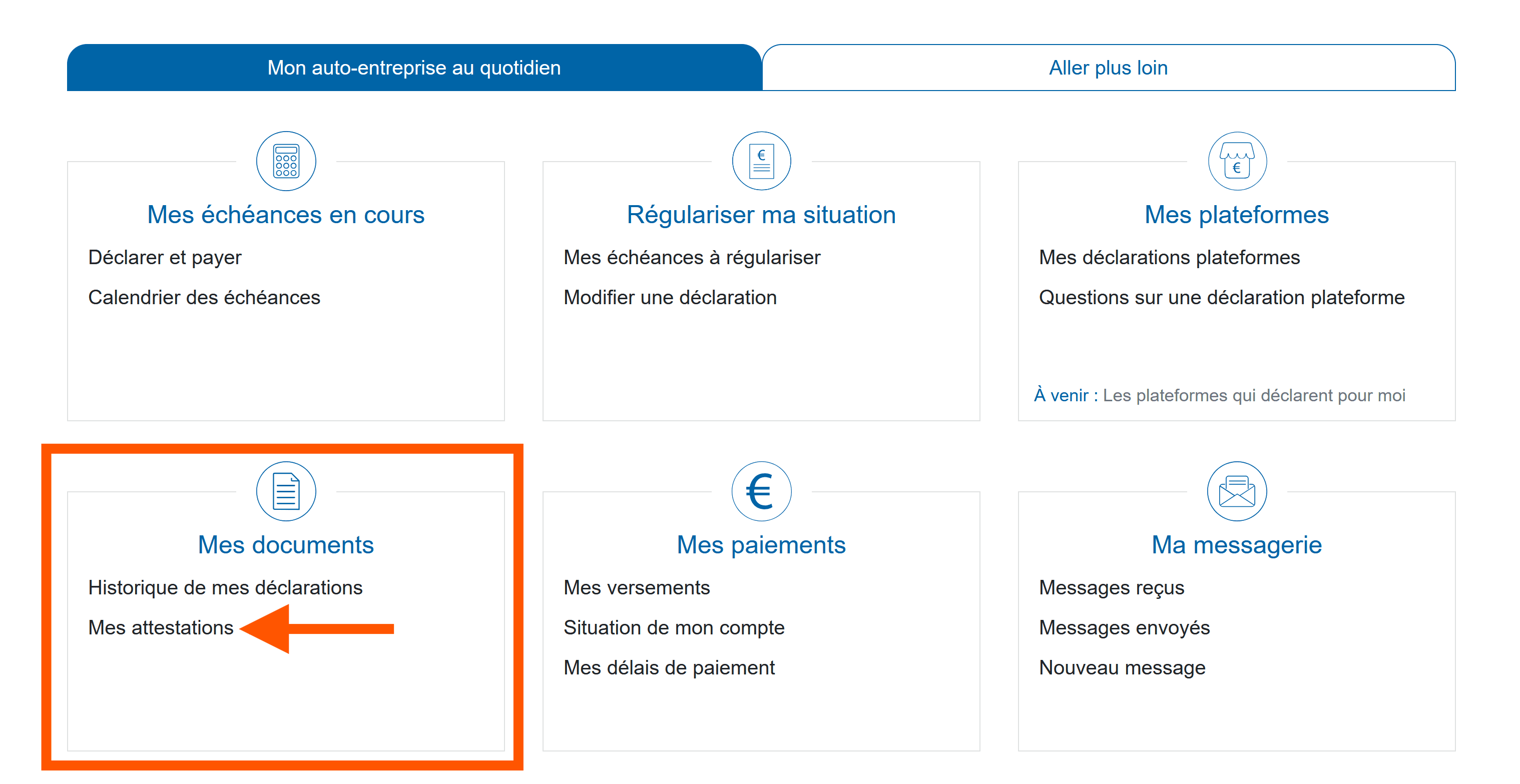
Once logged in, the tab "Gérer mon auto-entreprise" should be open by default. Scroll down the page to the "Mes documents" section, then click the link "Mes attestations" (My certificates).
Step 3 - Generate and download the document
On the attestations page, you will see a dropdown menu and a button labeled "Générer l'attestation" on the right side.
Select Attestation de vigilance from the dropdown, then click the button to generate it.
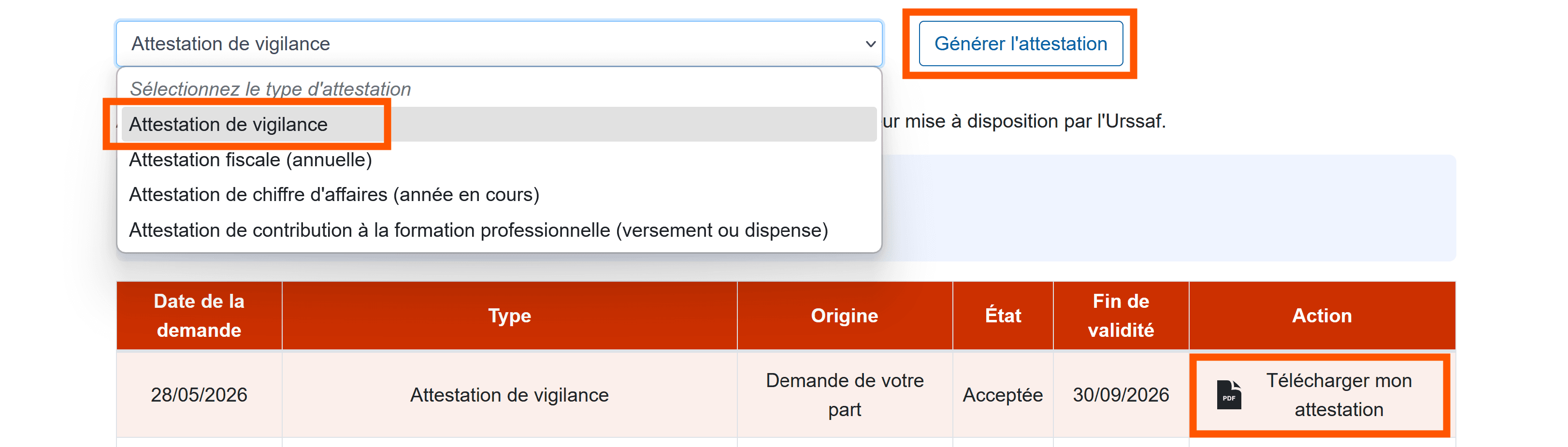
Once generated, the document appears in the list below. Click "Télécharger mon attestation" to download the PDF.
The document includes:
- Your full name
- Your SIRET number
- Confirmation that you are registered and up to date
- An expiry date
Step 4 - Send it to your employer
Download the PDF and send it to the employer who requested it. Email is fine. Most employers will accept it immediately.
The Document Expires - Plan Ahead
Valid for 6 months only
The attestation de vigilance expires 6 months after it was generated. You will need to download a fresh one from URSSAF after that date.
A good habit: at the start of each new contract or season, log in and generate a fresh attestation. Keep the PDF on your phone so you can share it immediately when asked.
Common Issues
"I cannot log in to my URSSAF account"
Use the password reset on the login page. If you never activated your online account, you will need to create one using your SIRET number. You can also call URSSAF directly at 3698 (free call from France).
"The generate button is greyed out or missing"
This usually means you have a pending revenue declaration or an unpaid contribution. Go to "Mes déclarations" and check that your latest period has been declared - even if your revenue was 0, the declaration is required.
"I do not have a SIRET number yet"
You need to complete registration first. URSSAF sends your SIRET by post and email, and it can take up to 4 weeks to be fully activated in the system.
Always declare, even at zero revenue
Many auto-entrepreneurs do not realise they must submit a declaration every period, even if they earned nothing. A missing declaration blocks the attestation. Set a reminder to declare on time every quarter or month depending on your schedule.
Why Employers Require It
From the employer's side, requesting the attestation de vigilance is a legal obligation. It protects them from liability under the travail dissimulé (undeclared work) rules. If they hire a self-employed person without checking, they can be fined and held jointly responsible for any unpaid social contributions.
So when an employer asks for it, it is not bureaucracy for the sake of it - it is a straightforward legal formality that takes you 2 minutes.
For the Business Asking for It
If you are the one who requested the attestation, here is the short version.
When you need to ask. The legal obligation kicks in when your work with one self-employed person passes 5,000 euros excluding tax over a calendar year. Below that the check is not required, though plenty of businesses ask anyway, because it is free and it settles the question early.
How often. The attestation is valid for 6 months, and the duty to check is every 6 months for as long as the working relationship continues. Ask again at renewal rather than keeping the first one on file indefinitely.
What to check when it arrives. Three things, and they take a minute:
- The name and SIRET on the document match the person and business you are actually paying.
- The issue date is recent, since the document is only valid for 6 months.
- The security code at the bottom of the PDF verifies on the URSSAF site. Anyone can check a code at urssaf.fr without an account, which is what turns the PDF from a claim into a verified document.
Keep the copy
Keep the attestation, or the record of your verification, for the duration of the work. If URSSAF ever asks, having checked is your defence, and being told the person was registered is not.
On Shifter. When a worker tells us they are registered as an auto-entrepreneur, we check that status against the French business registry before their profile reaches you, and you can filter your shift so only registered locals are notified. That narrows the field before you ever ask. It does not replace the attestation, because that has to come from the worker and has to be current, but it does mean you are asking someone who can actually produce one.
Workers: if you run into issues or have questions, reach out through the Shifter contact form. We are here to help with the admin side of working in France.
Businesses: you are welcome to send this page to anyone you are hiring, on Shifter or not. If you want to reach registered locals in the Chamonix Valley directly, see how hiring works on Shifter.

Jonas CHK
Founder of Shifter
French by origin, Jonas spent years living across the world before falling in love with Chamonix and deciding to stay for good. A tech enthusiast and entrepreneur, he builds digital products, consults for local businesses, and works with his wife on cultural projects. Shifter came out of a simple observation: local businesses and the people working in them were struggling to find each other. When he is not at the keyboard, you will find him in the mountains with his wife and dog.
Last updated
